Radio/Power Interface Cables

These cables can interface a TinyTrak or PicCon to many common handheld amateur radios and a 12V power supply.

These cables can interface a TinyTrak or PicCon to many common mobile amateur radios and a 12V power supply.
Computer Interface Cables
TT USB
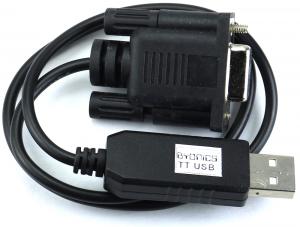
The TT USB cable will connect a TinyTrak3Plus, TinyTrak4, or MT-RTG to a computer USB port for configuring and operating.
In addition, if the TinyTrak is set for 5V on J7 (TT3+) or JP6 (TT4) to power a Byonics GPS, the TT USB will also provide the USB 5V to power the TinyTrak.
It is essentially a USB A to DB-9 female RS-232 serial adapter plus a F-F null modem cable, with the bonus of providing 5V to power the TinyTrak via pin DB-9 4.
Note: The TinyTrak or MicroTrak should NOT be connected to 12V when using the TT USB.
Note: Windows 11 does not need additional drivers installed for this cable.
 USB cable drivers
 - v1.7
Alternate USB cable drivers - v1.10. Some users have found that this driver version will work better with Windows 11.
 Windows USB Driver Solutions
 TT USB
 - $23
USB-2.5 Cable

The USB-2.5 cable is used to configure MicroTrak and MicroFox devices with a 2.5mm stereo programming jack.
Compatible with PicCon v3, but not PicCon v2.
It is a USB A to 2.5mm / 3/32" stereo TRS plug that internally contains the needed USB to RS-232 serial adapter.
This cable was previously called the AIO USB cable. Drivers available above.
Note: Windows 11 does not need additional drivers installed for this cable.
Having driver problems with Windows 11?
Try this link
USB-2.5 Cable - $23
DB9-2.5 Cable

The DB9-2.5 cable is used to configure MicroTrak and MicroFox devices with a 2.5mm stereo programming jack.
Compatible with PicCon v3, but not PicCon v2.
It is a female DB-9 to 2.5mm / 3/32" stereo TRS plug adapter that can be used with any computer serial port or standard USB-to-serial adapter, but not the TT USB above. It can also be used to connect a Kenwood D710A, D700A or D7A APRS radio to a computer. Wiring is female DB-9 pin 5 to 2.5mm shield, pin 3 to ring, and pin 2 to tip.
This cable was previously called the AIO Serial cable and the Kenwood D700A/D7A Serial Cable.
DB9-2.5 Cable - $19
 Back to the full Byonics product line

 The TT USB cable will connect a TinyTrak3Plus, TinyTrak4, or MT-RTG to a computer USB port for configuring and operating.
In addition, if the TinyTrak is set for 5V on J7 (TT3+) or JP6 (TT4) to power a Byonics GPS, the TT USB will also provide the USB 5V to power the TinyTrak.
It is essentially a USB A to DB-9 female RS-232 serial adapter plus a F-F null modem cable, with the bonus of providing 5V to power the TinyTrak via pin DB-9 4.
Note: The TinyTrak or MicroTrak should NOT be connected to 12V when using the TT USB.
The TT USB cable will connect a TinyTrak3Plus, TinyTrak4, or MT-RTG to a computer USB port for configuring and operating.
In addition, if the TinyTrak is set for 5V on J7 (TT3+) or JP6 (TT4) to power a Byonics GPS, the TT USB will also provide the USB 5V to power the TinyTrak.
It is essentially a USB A to DB-9 female RS-232 serial adapter plus a F-F null modem cable, with the bonus of providing 5V to power the TinyTrak via pin DB-9 4.
Note: The TinyTrak or MicroTrak should NOT be connected to 12V when using the TT USB. The USB-2.5 cable is used to configure MicroTrak and MicroFox devices with a 2.5mm stereo programming jack.
Compatible with PicCon v3, but not PicCon v2.
It is a USB A to 2.5mm / 3/32" stereo TRS plug that internally contains the needed USB to RS-232 serial adapter.
This cable was previously called the AIO USB cable. Drivers available above.
The USB-2.5 cable is used to configure MicroTrak and MicroFox devices with a 2.5mm stereo programming jack.
Compatible with PicCon v3, but not PicCon v2.
It is a USB A to 2.5mm / 3/32" stereo TRS plug that internally contains the needed USB to RS-232 serial adapter.
This cable was previously called the AIO USB cable. Drivers available above. The DB9-2.5 cable is used to configure MicroTrak and MicroFox devices with a 2.5mm stereo programming jack.
Compatible with PicCon v3, but not PicCon v2.
It is a female DB-9 to 2.5mm / 3/32" stereo TRS plug adapter that can be used with any computer serial port or standard USB-to-serial adapter, but not the TT USB above. It can also be used to connect a Kenwood D710A, D700A or D7A APRS radio to a computer. Wiring is female DB-9 pin 5 to 2.5mm shield, pin 3 to ring, and pin 2 to tip.
This cable was previously called the AIO Serial cable and the Kenwood D700A/D7A Serial Cable.
The DB9-2.5 cable is used to configure MicroTrak and MicroFox devices with a 2.5mm stereo programming jack.
Compatible with PicCon v3, but not PicCon v2.
It is a female DB-9 to 2.5mm / 3/32" stereo TRS plug adapter that can be used with any computer serial port or standard USB-to-serial adapter, but not the TT USB above. It can also be used to connect a Kenwood D710A, D700A or D7A APRS radio to a computer. Wiring is female DB-9 pin 5 to 2.5mm shield, pin 3 to ring, and pin 2 to tip.
This cable was previously called the AIO Serial cable and the Kenwood D700A/D7A Serial Cable.